






.svg)
Credit Card Setup
Welcome to Network Depot! In order to efficiently process your payments each month, we need to have your credit card on file. Our new system uses ConnectBooster to sync invoices from our billing system (ConnectWise) and QuickBooks with a secure web portal that you can use and self-manage. The benefit of this system is that Network Depot staff will NEVER have full access to your credit card information!
Please follow the three simple steps below to load your credit card information and pay invoices:
- STEP 1: Access http://pay.www.networkdepot.com *(this will re-direct you to the ConnectBooster site)
- STEP 2: Login using your email address and portal password.

- If you don’t know your portal password, click the Forgot password link and the system will send you your password if we have one on file.
- Please note: If you do NOT receive an email within a few minutes, it means that there is no password in the system for you. If this happens, please email to AR@networkdepot.com and we will create a password for you.
- Step 3: Enter your credit card(s) into the system.
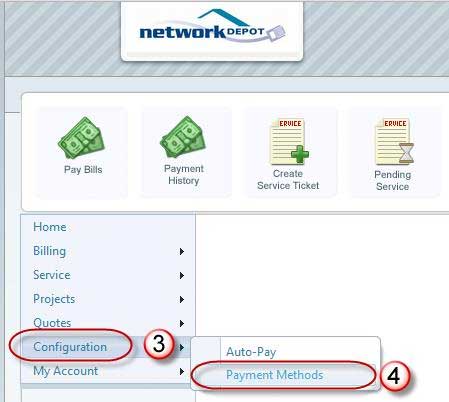
- From the left-hand menu, select Configuration (#3) and then select Payment Methods (#4).
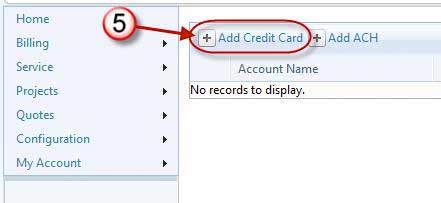
- Select Add Credit Card (#5)
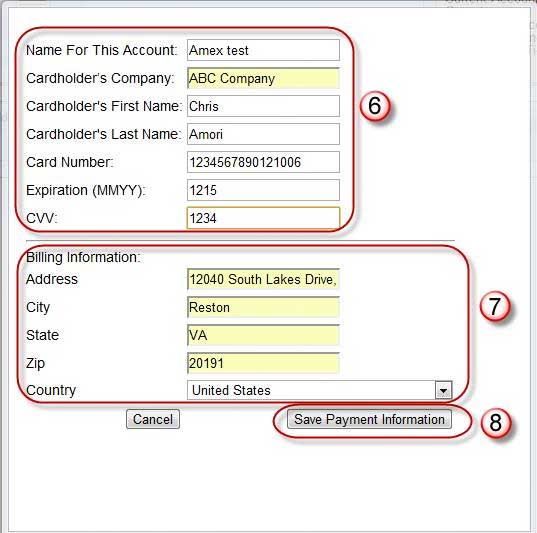
- When you return to menu you will see your credit card entered. Log in any time to make changes to your credit card, or add additional cards.

If you are new client, please email us at AR@NetworkDepot.com when you have finished the setup so that we may activate your account.
If you have any questions or problems, feel free to email us at AR@networkdepot.com or call us at 703-264-7776 Option #3
Sign up for email updates



Schedule a Free Consultation
